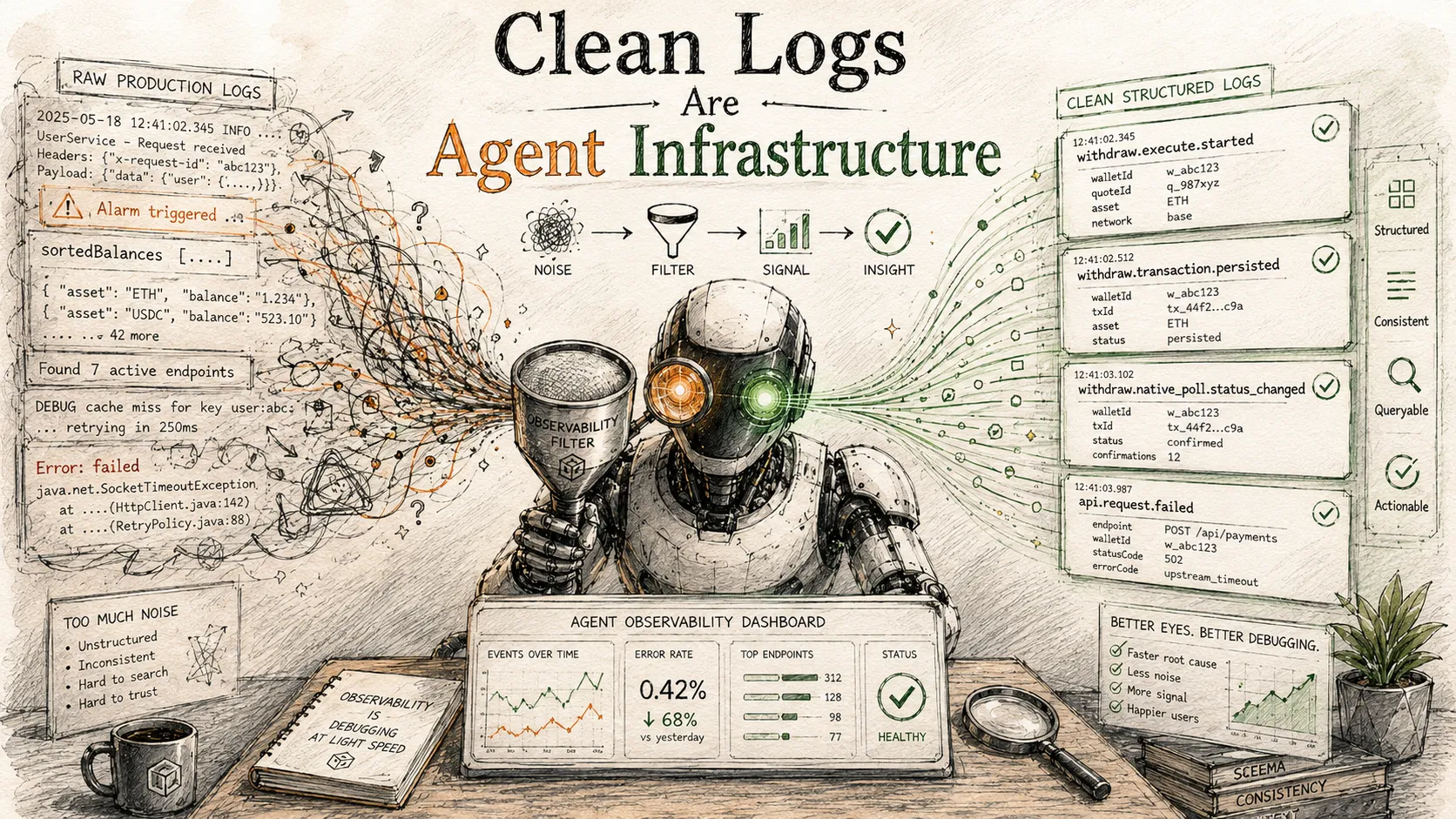
# Clean Logs Are Agent Infrastructure
Table of Contents
Coding agents can read code. They can run tests. They can search docs. And, if you give them access, they can inspect production logs through observability MCP servers.
That last part is more important than it first sounds. Production logs are no longer only for humans squinting at dashboards. They are now an interface your agent can query, filter, group, correlate, and reason over.
Which means bad logs are no longer just annoying.
Bad logs make your agent worse.
The New Consumer Of Your Logs
For years, logging advice was written for humans:
- Make errors readable.
- Include enough context.
- Avoid logging secrets.
- Do not spam production.
All still true. But agentic debugging adds a second consumer: an LLM-driven investigator using tools like Cloudflare Workers Observability MCP to answer questions from production telemetry.
That agent is excellent at some things humans are slow at:
- Searching a week of logs for a rare phrase.
- Grouping errors by endpoint, wallet, user segment, provider, route, or status.
- Reconstructing timelines across API requests, Durable Object alarms, cron jobs, and webhooks.
- Comparing behavior before and after an incident.
- Forming a hypothesis from code, then testing it against production evidence.
But it is also easy to mislead. If your logs are noisy, unstructured, full of raw payloads, or missing correlation fields, the agent spends its context budget on junk. It finds the loudest thing instead of the relevant thing.
The quality of your logs becomes the quality of your agent’s eyes.
A Small Incident, Anonymized
Imagine a simple flow:
- A user trades one asset into another.
- Immediately after the trade, the system attempts to withdraw the new asset.
- The exchange accepts the withdrawal request and returns an external reference ID.
- The local transaction later appears as failed.
A human might start with the API response. Did the exchange reject it? Was the address wrong? Was the network unsupported? Did the fee calculation underfund the withdrawal?
An agent with production observability can do better, but only if the logs are shaped for investigation.
The useful timeline should look like this:
11:52:48  withdraw.execute.started          walletId=... quoteId=... exchange=... asset=... network=... amount=...
11:52:49  withdraw.transaction.persisted          recordId=... externalRefId=... status=pending
11:53:20  withdraw.native_poll.scheduled          recordId=... externalRefId=...
11:54:51  withdraw.native_poll.status_changed          recordId=... previousStatus=pending currentStatus=failed providerRawStatus=...
That is debuggable. The agent can search recordId, group by providerRawStatus, inspect all failures for the same asset/network pair, and check whether the failed status came from the exchange, the local post-processing layer, a webhook retry, or a background poller.
Now compare that with the usual production log soup:
Direct execution [abc123] { giant workflow params object... }balancesWithNetworkInfo [...]sortedBalances [...][WebhookEndpoints] Found 7 active endpoints[WebhookEndpoints] Endpoint 0 events=[...][TenantDO] Alarm triggeredError: failedThe agent can still search this, but it has to infer everything. Worse, the loud success-path logs bury the one line that matters.
When agents investigate production, log noise is not cosmetic. It is operational drag.
What Makes A Log Agent-Friendly?
Agent-friendly logs have five properties.
1. Stable Event Names
Every important event should have a stable, low-cardinality name:
logInfo('withdraw.execute.started', { walletId, quoteId, exchange, asset, network, amount,})Prefer this over:
console.log(`Starting withdrawal for ${walletId} on ${exchange}`)The prose version is readable once. The structured version is searchable forever.
Stable event names let an agent ask:
- Show me all
withdraw.execute.startedevents around this time. - Count
withdraw.native_poll.status_changedbycurrentStatus. - Find every
webhook.delivery.max_attemptsin the last seven days. - Compare
api.request.failedby route path.
Good event names are boring. That is the point.
Use a predictable namespace:
api.request.failedapi.request.slowwithdraw.execute.startedwithdraw.execute.completedwithdraw.errorwithdraw.native_poll.status_changedwebhook.delivery.failed_attemptwebhook.delivery.max_attemptsprovider.withdraw_info.live_fallbackThe name should say what happened, not include the data that changed. Put changing values in fields.
2. Correlation Fields Everywhere
An agent cannot reconstruct a timeline without handles.
For transactional systems, the same fields should appear across the request, persistence, polling, webhook, and error logs:
{ orgId, projectId, walletId, quoteId, transactionId, recordId, exchange, asset, network,}You do not need every field on every log. But each log should include enough to join it to the next step.
The most valuable fields are usually:
- Tenant or organization ID.
- User or wallet ID.
- Request ID, quote ID, order ID, transaction ID, or idempotency key.
- Exchange/provider name.
- Asset and network.
- Route path, not raw URL.
- External provider reference ID.
- Previous and next status when state changes.
For background systems, include the scheduling identity too:
logInfo('withdraw.native_poll.scheduled', { recordId, walletId, quoteId, exchange, asset, refid, nextPollAt,})This lets the agent answer the real question: “What happened to this thing after the API returned?“
3. Logs For State Transitions, Not Every Step
Do not log every heartbeat.
Do log every meaningful state transition.
Good:
withdraw.execute.startedwithdraw.execute.completedwithdraw.transaction.persistedwithdraw.native_poll.status_changedwithdraw.errorwebhook.delivery.max_attemptsUsually noisy:
Alarm triggeredProcessing 12 pending itemsFound endpoint 0Found endpoint 1Broadcasted to 0 listenersBalance array after enrichment: [...]Successfully refreshed balancesThe distinction is not “success logs bad, error logs good.” Success logs are useful when they mark a boundary:
- A trade order was accepted.
- A withdrawal was submitted.
- A transaction row was persisted.
- A poller observed a terminal provider status.
- A webhook eventually delivered after retries.
But success-path chatter inside tight loops or frequent alarms will dominate query results.
A simple rule: if the log would not help reconstruct an incident timeline, it probably does not belong in production at info.
4. Structured Errors Without Raw Payloads
Agents need error context. They do not need secrets, addresses, API responses, cookies, signatures, tokens, or full webhook payloads.
Never do this:
console.error('Withdrawal failed:', rawProviderResponse)Do this:
logError('withdraw.error', { code: serializedError.code, errorMessage: serializedError.message, hasRawResponse: Boolean(serializedError.rawResponse), walletId, quoteId, exchange, asset, network,})Persist raw provider responses where appropriate, behind your normal data access controls. Keep logs safe and compact.
This matters for two reasons:
- Logs tend to flow into many systems with many readers.
- Agents are very good at pattern matching, but every extra raw object burns context and increases the chance of extracting the wrong signal.
Sanitize at the logger boundary, not at every call site. A small shared logger should redact keys like:
addressapiKeyapiSecretauthorizationcookiepasswordprivateKeyrawResponsesecretsignaturetokentwofaAlso strip query strings from URL fields. Webhook URLs, OAuth callbacks, and provider URLs often carry sensitive or high-cardinality data.
5. Low Cardinality By Default
Agents often group logs. High-cardinality log names and fields make grouping useless.
Avoid event names like:
withdraw.failed.ASSET.NETWORK.wallet_123Use:
logError('withdraw.error', { asset: 'ASSET', network: 'Ethereum', walletId: 'wallet_123',})The event name should be stable. The fields should vary.
For paths, log route patterns instead of raw paths:
/v0/wallet/transaction/:idinstead of:
/v0/wallet/transaction/transaction_123This lets the agent group failures by endpoint rather than producing one group per UUID.
A Practical Logging Contract
Here is the logging contract I now want in any Workers API that an agent will debug later.
API Middleware
At the edge of the app:
- Log non-throwing 500s as
api.request.failed. - Log thrown unexpected errors as
api.request.error. - Log slow successful requests as
api.request.slow. - Include method, route path, status, duration, tenant IDs, wallet/user ID if available, and Cloudflare Ray ID if present.
Do not re-enable generic request logging unless you have sampling and a clear reason. Request-per-line logs can swamp everything else.
Command Handlers
At the start of an important operation:
logInfo('withdraw.execute.started', { quoteId, walletId, exchange, asset, network, amount, dryRun,})At completion:
logInfo('withdraw.execute.completed', { quoteId, recordId, walletId, exchange, asset, network, transactionId,})On expected provider errors:
logError('trade.order.failed', { walletId, exchange, routeId, side, type, volume, error,})Avoid dumping full request bodies or response bodies.
Durable Objects And Alarms
Durable Object alarms are often the worst offenders. They run frequently, and the temptation is to log every pass:
Alarm triggeredProcessing 10 retriesNo webhook endpoints foundItem already terminalMost of that should disappear.
Keep:
- Retry exhausted.
- Status changed.
- Provider polling failed.
- Webhook delivery permanently failed.
- Secret decryption failed.
- Unexpected persistence failure.
Drop:
- Alarm triggered.
- Nothing to do.
- Already scheduled.
- Already terminal.
- No subscribers.
- Broadcast success.
The alarm is not the story. The state transition is the story.
Webhooks
Webhook systems need logs, but not for every internal branch.
Useful:
webhook.delivery.failed_attemptwebhook.delivery.max_attemptswebhook.endpoint.secret_missingwebhook.endpoint.secret_decrypt_failedUsually noisy:
Querying endpointsFound 3 endpointsEndpoint 0 has event=trueDelivery succeededScheduled retry for 2026-...The database already has delivery records. Logs should highlight conditions an agent should investigate.
Before And After
Before:
console.log('balancesWithNetworkInfo', balancesWithNetworkInfo)console.log('enrichedBalances', enrichedBalances)console.log('sortedBalances', sortedBalances)console.error(`Failed to store transaction ${txid}:`, err)console.log('[TenantDO] Alarm triggered')console.log(`[WebhookEndpoints] Found ${endpoints.length} active endpoints`)After:
logWarn('wallet.balance.refresh_failed', {  walletId,  exchange,  error,})
logInfo('withdraw.transaction.persisted', {  recordId,  walletId,  quoteId,  exchange,  asset,  network,  transactionId,})
logWarn('webhook.delivery.max_attempts', {  deliveryId,  endpointId,  webhookEvent,  eventId,  attemptCount,  responseStatus,  errorMessage,})
The second version has less text and more information.
That is the core trick.
The Agent Debugging Loop
Once logs are clean, the debugging loop changes.
Instead of asking an agent:
Can you look at this one error and guess what happened?
You can ask:
Search production logs for this transaction ID, reconstruct the timeline, group similar failures in the last seven days, and compare provider raw statuses by asset/network.
The agent can then:
- Read the relevant code paths.
- Query logs by stable event name.
- Pivot on correlation fields.
- Identify whether failure came from request handling, provider submission, local persistence, background polling, or webhook delivery.
- Find similar cases.
- Suggest whether this is a code bug, provider behavior, user configuration issue, or missing product expectation.
This is a qualitatively different workflow from dashboard spelunking.
It only works if the logs cooperate.
A Checklist For Agent-Ready Logs
Use this before shipping a new workflow:
- Does every major operation have a
startedand terminal event? - Are state transitions logged with previous and next status?
- Can I join API logs, database records, background jobs, and webhooks with shared IDs?
- Are route paths normalized?
- Are provider reference IDs included?
- Are raw provider payloads excluded from logs?
- Are addresses, tokens, secrets, signatures, cookies, and authorization values redacted centrally?
- Are high-volume success-path logs removed or sampled?
- Are retry exhaustion and permanent failure states logged?
- Can I group the logs by event name and get a meaningful distribution?
- If an agent searched for one transaction, would it find the story or just the noise?
What To Remove First
If your production logs are already noisy, start here:
- Remove logs from pure mapping/normalization functions.
- Remove logs that print full arrays or full objects.
- Remove “successfully did X” inside frequent paths unless it marks a transaction boundary.
- Remove “nothing to do” logs from alarms, pollers, queues, and cron jobs.
- Remove per-endpoint/per-item logs inside loops.
- Remove raw request/response dumps.
- Replace prose errors with structured event names and fields.
You do not need a giant observability project. You need a few stable events and the discipline to delete the rest.
The Shift
Observability used to be something humans consumed after the fact.
Now it is part of the development environment. A coding agent with MCP access can investigate production, validate hypotheses, and find patterns across systems — but only if production emits a signal it can understand.
Clean logs are not just nicer logs.
Clean logs are agent infrastructure.
They are how you give your agent eyes.