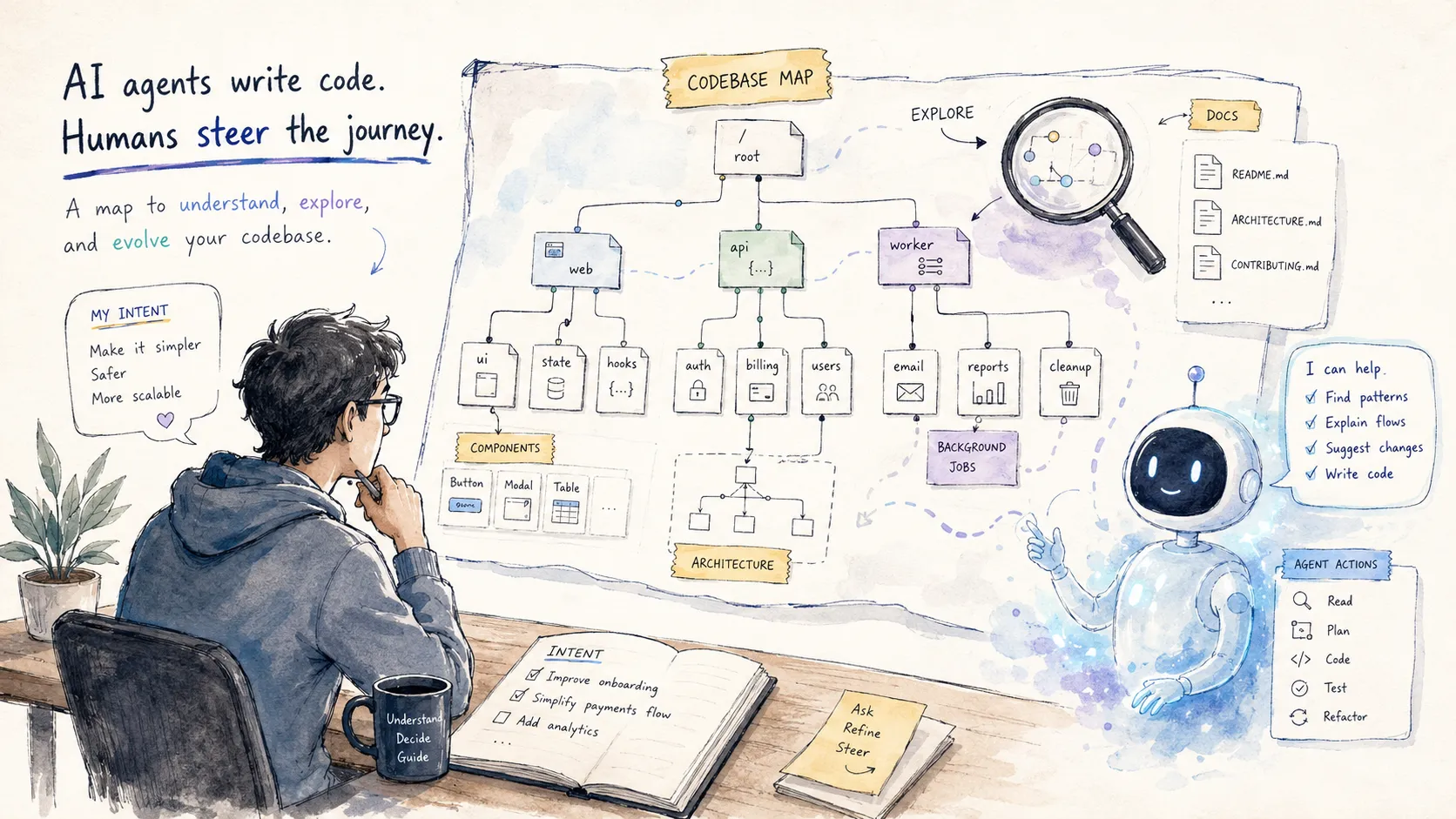
# Codebase Learning Is Agent Infrastructure
Table of Contents
Coding agents are getting good enough that the strange part is no longer whether they can write code.
They can.
The stranger part is what happens to the developer when they do.
When a model starts making better implementation choices, not just writing syntactically correct code, the workflow changes. It is no longer only autocomplete. It becomes closer to working with a senior engineer who can plan, delegate, refactor, and clean up after other models.
That is powerful.
It also creates a new failure mode.
You read less code.
At first, that feels like the entire point. Less manual implementation. Less digging through files. Less boring glue work. More product velocity.
But reading code was never only about producing code.
Reading code was how you learned the codebase.
The next bottleneck in agentic coding is not only the model’s context window.
It is the human’s context window.
The New Coding Workflow
The emerging workflow looks roughly like this:
- Use a strong model as the orchestrator.
- Use cheaper or faster models as implementation workers.
- Let the orchestrator plan, review, refactor, and steer.
- Let the workhorse models write most of the code.
- Let the human describe intent, approve direction, and intervene when taste matters.
This makes sense.
The workhorse model can generate a lot of code. It can solve most implementation tasks. It can keep going for a long time without getting stuck.
The orchestrator can act more like a senior developer. It can make better design calls, notice when a change is accumulating too much debt, and refactor the implementation into something cleaner.
The result is a workflow where a lot of code gets written without the human touching every file.
That is not automatically bad.
In fact, it may be the correct shape of future software development.
But it changes what the human is doing.
The human is no longer primarily writing the code.
The human is steering the system that writes the code.
And steering requires context.
The Old Safety Mechanism
Before agents, the workflow was slower.
You opened the files. You found the relevant component. You read the surrounding code. You noticed the weird naming. You learned where state lived. You discovered the old abstraction that no one liked but everyone still depended on.
Then you made the change.
That process felt inefficient because a lot of it was not directly productive.
But it had an important side effect: it loaded the codebase into your head.
You learned:
- Where things are.
- What things are called.
- Which components own which responsibilities.
- Which abstractions are real and which are accidental.
- Which parts of the codebase are clean.
- Which parts are cursed.
- Which tradeoffs were intentional.
- Which tradeoffs are just historical damage.
That knowledge made your future prompts better before prompts existed.
It made your future pull requests better.
It made your product judgment better.
The codebase was teaching you while you worked on it.
The New Failure Mode
With agents, the loop can become:
describe intentagent searches codeagent edits filesagent runs testsagent summarizes changeshuman skims diffhuman approvesThat loop is fast.
It also removes a lot of accidental learning.
You may ship the feature without ever building a real mental model of the code you just changed.
The first few times, this is fine. The model had enough context. The diff looked reasonable. The tests passed. The product moved forward.
Then the codebase keeps changing.
Some changes are made by you. Some by agents. Some by other people using agents. The system grows. The abstractions shift. New conventions appear. Old ones decay. Components move. Responsibilities split. State migrates from one layer to another.
You still know the product.
But you know less and less about how the product is represented in code.
Eventually the problem is not that the agent cannot write the code.
The problem is that you do not know what to ask for.
Prompt Quality Decays With Human Context
Good prompts are not magic words.
Good prompts are compressed context.
A weak prompt says:
Make the sidebar work with team workspaces.A stronger prompt says:
The sidebar is currently user-scoped, but navigation needs to become workspace-scoped.
Keep the Sidebar component presentational.Move workspace resolution into the navigation provider.Preserve the command palette behavior.Do not duplicate route filtering logic.Update the empty state for users with access to multiple workspaces.
The second prompt is not better because it is longer.
It is better because the human understands the codebase.
They know where the responsibility should live. They know which abstraction should not be duplicated. They know which adjacent feature depends on the same state. They know the old intention and the new intention.
That is the part agents do not remove.
They make it easier to implement a direction.
They do not remove the need to choose the direction.
If the human loses the map, the steering gets worse.
And when steering gets worse, the product eventually gets worse too.
The Problem Moves
A lot of agent infrastructure is focused on giving the model more context.
That is useful.
Agents need to search the repo. They need to read files. They need to inspect traces. They need to run tests. They need to recover architectural intent from whatever artifacts exist.
But there is another context problem.
The human also needs context.
Not every detail. Not every line. Not every helper function.
But enough to make good decisions.
Enough to know:
- What is the shape of this feature?
- What owns this state?
- What is this component trying to be?
- Which parts are legacy?
- Which abstractions are load-bearing?
- Which names matter?
- Which decisions are still valid?
- Which decisions were made for requirements that no longer exist?
The agent needs context to act.
The human needs context to judge.
Those are different products.
The Missing Layer Is Codebase Learning
The missing tool is not just better code search.
It is not just better documentation.
It is a codebase teacher.
Something that continuously teaches the human how the system works.
Not in the abstract.
Not as a giant README that slowly rots.
But as a living explanation layer attached to the codebase.
A good codebase teacher should answer questions like:
- What are the main concepts in this area?
- Where does this UI come from?
- Which component owns this behavior?
- Why is this flow split across these files?
- What changed recently?
- What is the intended direction?
- What should I not touch casually?
- What is the old design that we are trying to migrate away from?
This is not only for onboarding new engineers.
It is for existing engineers who are using agents enough that they no longer naturally absorb the codebase through manual implementation.
The more code the agent writes, the more important this becomes.
Documentation For The Human, Not The Agent
There is a temptation to solve this by stuffing more documentation into the agent context.
That helps the agent.
It does not fully help the human.
The human does not need a bloated context dump before every task. The human needs a navigable map.
A useful codebase learning layer should be optimized for progressive disclosure.
Start high level:
- What is this feature?
- What are the core concepts?
- What are the main flows?
Then let the human drill down:
- Which files implement this?
- Which components are involved?
- Which services are called?
- Where does state live?
- What are the edge cases?
Then go lower only when needed:
- Why does this function exist?
- What assumptions does it make?
- What breaks if I change it?
Most of the time, the human does not need the lowest level.
They need the level above the code.
They need the intentions.
The Knowledge Tree
One practical shape is a tree of Markdown files.
Not one giant document.
Not scattered READMEs.
A structured knowledge tree.
For example:
/codebase /map.md /glossary.md /features /workspace-navigation overview.md concepts.md ui.md state.md backend.md decisions.md debts.md files.md /billing-settings overview.md concepts.md ui.md provider-integrations.md decisions.md debts.md files.md /components /app-shell.md /command-palette.md /data-table.md /changes /2026-07-08-workspace-navigation.md /2026-07-02-billing-provider-refactor.mdThe top of the tree should be readable in a minute.
Each page should point to deeper pages.
Each deeper page should explain one thing clearly.
The point is not to document every line of code.
The point is to preserve the map that the human used to build manually by reading code.
Prefer Intentions Over Summaries
Bad generated documentation looks like this:
This file exports a React component called Sidebar.It imports useWorkspace, Link, cn, and NavigationItem.It renders a list of navigation items.That is technically true.
It is also mostly useless.
The code already says that.
Useful documentation explains intent:
Sidebar is intentionally presentational.
It receives the resolved navigation model from WorkspaceNavigationProviderand should not decide which workspace is active.
This keeps route ownership in one place and prevents the command palette,sidebar, and mobile nav from each implementing their own filtering logic.
That is the knowledge the human needs.
Not only what the code does.
Why the code is shaped that way.
Make The UI Explain The Code
For product engineers, a lot of codebase learning starts from the interface.
You see a button.
You want to know where it lives.
You see a page.
You want to know which components compose it.
You see a weird behavior.
You want to know which state transition caused it.
A codebase teacher should connect UI to code.
For example, imagine a development overlay that lets you inspect a page and see:
Page  WorkspaceSettingsPage  app/workspaces/[workspaceId]/settings/page.tsx
Sections  WorkspaceMembersPanel  WorkspaceBillingPanel  WorkspaceDangerZone
Data  getWorkspaceSettings()  getWorkspaceMembers()  getBillingSubscription()
State ownership  Server state: workspace settings  Client state: pending invite modal  URL state: selected settings tab
That kind of tool changes how you prompt.
Instead of saying:
Change the settings page so members are easier to invite.You can say:
In WorkspaceSettingsPage, update WorkspaceMembersPanel so the invite flow is primary.
Keep pending invite modal state local to the members panel.Do not move billing logic.Preserve the selected settings tab in the URL.
The second prompt is not just more specific.
It is anchored in the codebase.
Track Decisions, Not Just Files
Most codebase knowledge is not file knowledge.
It is decision knowledge.
The important questions are usually:
- Why is this state here?
- Why is this feature split here?
- Why does this service own this operation?
- Why are we not using the shared component?
- Why is this still duplicated?
Agents can often infer these answers from code, but inference is not the same as knowledge.
If the decision matters, write it down.
A decision note can be small:
# Decision: Workspace Navigation Owns Route Filtering
Date: 2026-07-08
Workspace navigation owns route filtering because the sidebar,mobile navigation, and command palette all need the same visibility rules.
Do not duplicate filtering in individual components.
If workspace roles become more complex, extend the navigation model insteadof adding per-component permission checks.
This is not bureaucracy.
This is steering infrastructure.
The next time a human asks an agent to change navigation, the human can quickly recover the intention and prompt from it.
Keep Track Of Debt
Agents can work around technical debt very effectively.
Sometimes too effectively.
A strong model can route around bad abstractions, patch fragile code, and make the tests pass. That is useful in the short term. It can also hide the fact that the system is getting harder to reason about.
Debt should be part of the learning layer.
Not as shame.
As map data.
For example:
# Known Debt: Billing Settings
- Billing provider logic is still partially mixed into the UI layer.- Subscription status names are provider-shaped, not domain-shaped.- There are two sources of truth for trial expiration.- The current migration direction is to introduce BillingAccount as the domain object.
This helps the human steer.
A weak prompt says:
Add support for annual plans.A stronger prompt says:
Add support for annual plans, but do not deepen the provider-shaped status model.
Use this as a step toward BillingAccount becoming the domain object.Avoid adding new subscription status branching inside the UI components.
That prompt is only possible if the human knows the debt.
The Agent Should Update The Teacher
The learning layer cannot depend on humans writing perfect docs after every change.
That will fail.
The agent should update the codebase teacher as part of the development loop.
After a meaningful change, the agent should produce a knowledge diff:
- Updated feature overview
- Updated affected components
- Added new decision note
- Added new known debt
- Marked old intention as deprecated
- Linked changed files
The pull request should include both code and explanation.
Not a giant essay.
A small, structured update to the map.
For example:
# Change: Workspace-Scoped Navigation
Changed- Navigation is now resolved per workspace.- Sidebar remains presentational.- Command palette now consumes the same navigation model.
Why- Users can belong to multiple workspaces.- Navigation visibility depends on workspace role.
Do not- Add workspace filtering inside individual nav components.- Duplicate role checks in the command palette.
Files- app/workspaces/[workspaceId]/layout.tsx- components/navigation/sidebar.tsx- components/navigation/command-palette.tsx- lib/navigation/workspace-navigation.ts
This makes the agent’s work legible to the human later.
It also makes future prompting better.
The Review Changes
Code review also changes.
In the old workflow, review was mostly about the diff.
With agents, review has to include the knowledge layer.
For meaningful changes, the reviewer should ask:
- Did the code change match the intended architecture?
- Did the agent create a new abstraction or deepen an old one?
- Did any concept get renamed?
- Did ownership of state move?
- Did the documentation tree get updated?
- Did the decision record change?
- Did the known debt change?
- Would a future human know how to prompt around this area?
That last question matters.
A codebase can pass tests and still become harder to steer.
This Is Not About Reading No Code
The goal is not to stop reading code entirely.
That is a fantasy.
Sometimes you need to inspect the exact implementation. Sometimes the abstraction leaks. Sometimes the model’s summary is wrong. Sometimes the only way to understand a bug is to read the function and run the test.
The goal is different.
Read code when code is the right level of detail.
Do not force humans to rediscover the whole architecture from raw files every time they need to make a product decision.
A map does not replace the territory.
But without a map, every trip starts from zero.
A Practical Codebase Teacher Contract
For every important feature, aim for a small set of living documents.
At The Feature Level
Explain:
- What the feature does.
- The main user flows.
- The core domain concepts.
- The current product intention.
- The main entry points.
- The important files.
- The known edge cases.
Avoid:
- Repeating obvious code structure.
- Listing every import.
- Writing generated prose that says nothing.
- Mixing outdated intentions with current ones.
At The Component Level
Explain:
- What the component owns.
- What the component must not own.
- Which props are domain concepts.
- Which state is local.
- Which state comes from the URL, server, or provider.
- Which other components depend on the same model.
Avoid:
- Treating every component equally.
- Documenting trivial presentational components.
- Describing JSX line by line.
At The Decision Level
Explain:
- What decision was made.
- Why it was made.
- Which alternatives were rejected.
- What would make the decision invalid.
- Where the decision is implemented.
Avoid:
- Turning decision notes into meeting notes.
- Keeping decisions after they are no longer true.
- Hiding uncertainty.
At The Debt Level
Explain:
- What is awkward.
- Why it exists.
- What not to build on top of.
- What direction the code should move in.
- Which future change would pay it down.
Avoid:
- Vague complaints.
- Blame.
- Giant refactor wishlists.
- Debt notes with no steering value.
At The Change Level
Explain:
- What changed.
- Why it changed.
- Which intentions changed.
- Which files matter.
- Which prompts would be better next time.
- Which docs were updated.
Avoid:
- Commit-summary noise.
- “Updated code” explanations.
- Stale generated summaries.
Checklist For Human-Ready Agentic Codebases
Before relying on agents heavily in a codebase, ask:
- Can a developer understand the top-level system without reading every file?
- Is there a glossary for domain concepts?
- Can a developer map a visible UI element to its component?
- Can a developer find where state is owned?
- Can a developer see which abstractions are intentional?
- Can a developer see which abstractions are legacy?
- Are important decisions written down?
- Are known debts written as steering notes?
- Does the agent update documentation after meaningful changes?
- Are documentation changes reviewed with code changes?
- Can the human quickly recover enough context to write a good prompt?
- Can the human tell when the agent is moving in the wrong direction?
- Is the knowledge layer organized by feature, concept, and intention?
- Is low-level detail available without making the top level bloated?
- Would a new developer know what not to touch casually?
- Would a future version of you understand why this code is shaped this way?
The point is not documentation coverage.
The point is steering quality.
The Tradeoff
Agentic coding creates a real tradeoff.
If you read every line, you give up much of the speed that agents provide.
If you read almost nothing, you slowly lose the ability to steer.
The answer is not to go back to manual coding.
The answer is not to blindly trust the agent either.
The answer is a codebase learning layer:
- Human-readable maps.
- Feature-level explanations.
- Component ownership notes.
- Decision records.
- Known debt.
- UI-to-code navigation.
- Change summaries.
- Progressive detail.
- Agent-updated documentation.
- Reviewable intention.
This gives the human enough context to guide the system without forcing them to manually reconstruct the system from scratch.
The Shift
Software development used to teach the developer by making the developer write the code.
Agentic coding breaks that default.
The code can now be written without the human learning all of it.
That is the opportunity.
It is also the risk.
The future developer is not just a prompt writer. The future developer is a steward of intentions. They decide what the system should become, which abstractions should survive, which debts should be paid down, and which direction the agents should move.
But you cannot steward what you do not understand.
Codebase learning is not documentation theater.
It is how you keep the human in the loop without forcing the human to read every line.
It is how you make agents write more code without making humans understand less software.
Your agent can have a larger context window.
Your product still depends on the human one.